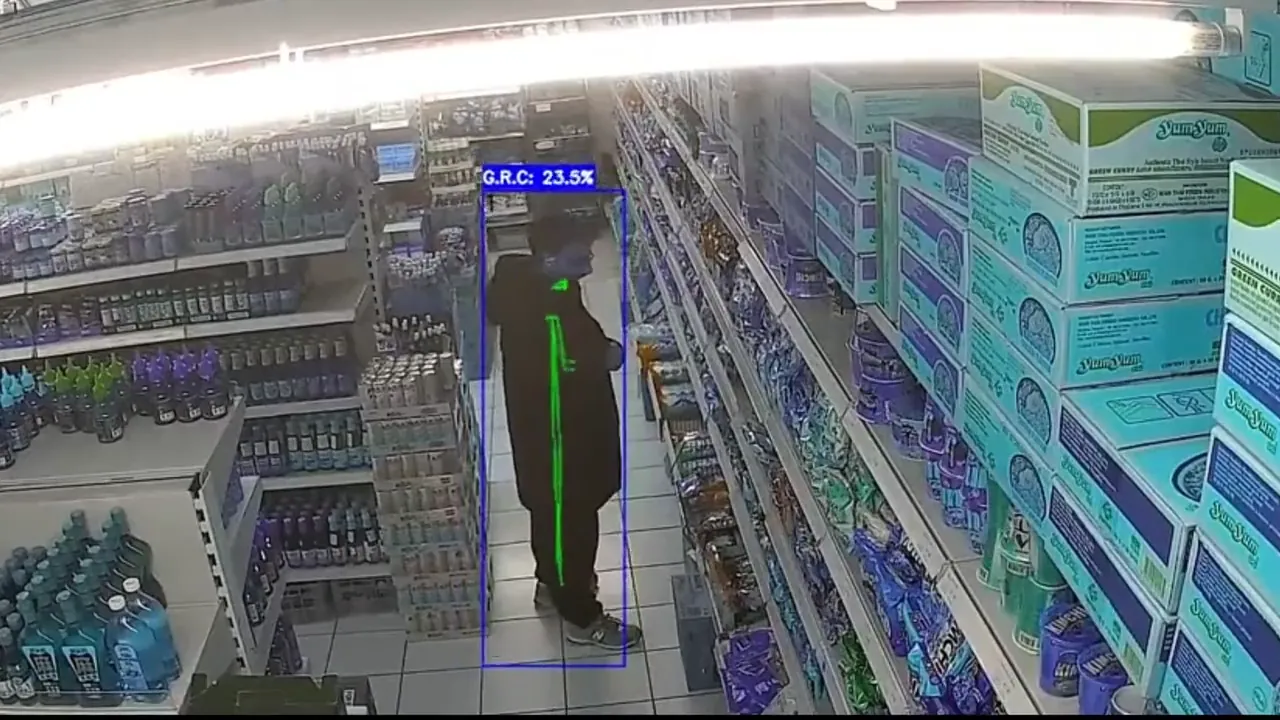
Busy floors hide risk
Staff attention is split across aisles, checkouts, entrances, and storage areas, so unusual activity can blend into normal movement.
AIn-Guard detects shoplifting the moment it happens and sends your team the clip to their phone. 30 seconds later someone is standing next to them. No new cameras, no facial recognition.
This is what you see on your phone: the moment, the camera, the clip. Your team walks over before the goods leave the shop.
One stolen can of Red Bull costs you nine sold ones. A few items a day adds up to a four-figure sum by year end. And the footage of it sits unseen on your recorder.
AIn-Guard changes that by turning passive cameras into real-time event detection .
Staff attention is split across aisles, checkouts, entrances, and storage areas, so unusual activity can blend into normal movement.
Footage is usually checked only after something has happened. By then, the chance to react in real time is gone.
Finding the right moment by hand takes time, creates delays, and makes incident review harder to prioritize.
AIn-Guard monitors live camera activity, detects unusual movement patterns, creates reviewable alerts, and notifies authorized staff so incidents can be reviewed in real time.

AIn-Guard analyzes live camera streams by extracting human skeletal movement data. These movement patterns are compared with our machine vision model to identify suspicious behaviour.
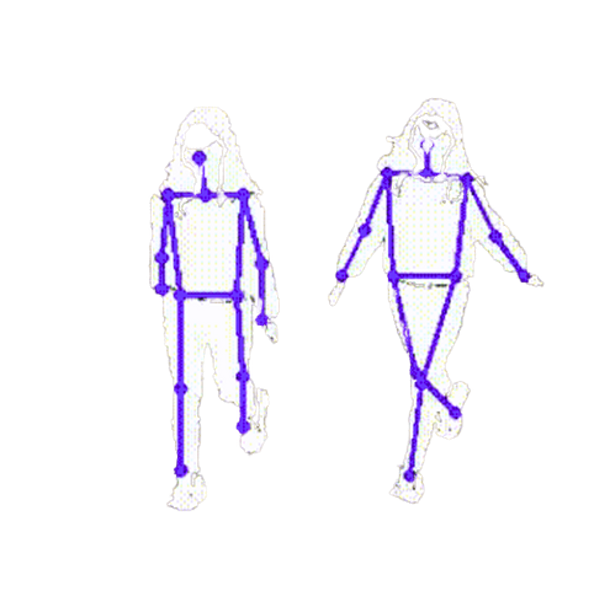
AIn-Guard does not use Biometrics. It analyzes skeletal movement data from live camera streams to detect posture, movement, stopping, turning, and concealment-like actions that may require staff review.
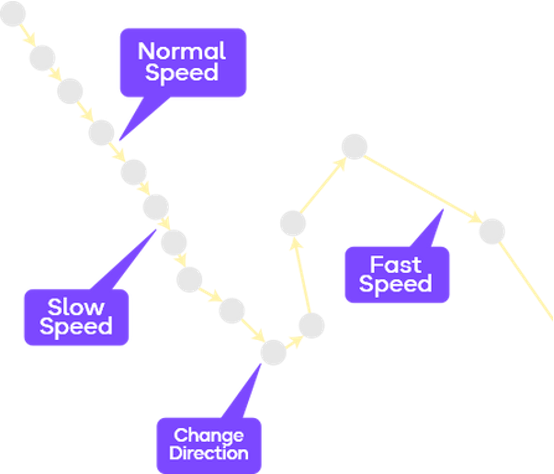
AIn-Guard identifies movement patterns that may indicate concealment-like or unusual behavior, then sends the relevant moment to authorized staff as a reviewable alert.
These are the results AIn-Guard delivers in retail. In the 4-week test you see on your own camera how much of that lands in your shop.
Up to 34%
Less loss in the monitored zones, because your team steps in before the goods leave the shop.
Up to 92%
AIn-Guard detects suspicious behaviour in real shops with 87–92 % accuracy. Day and night, without a break.
4 weeks
One camera, the zone with the highest shrinkage, four weeks. At the end you see in black and white what AIn-Guard caught in your shop.
Minutes
Cloud-based alerts are delivered within 15–30 seconds, compared to 3–5 minutes with traditional footage review.
Respond up to 600% faster than traditional measures*Figures from internal case studies. Results depend on the location and on how the team acts on alerts, and are not a guarantee.
Focus review attention on the store areas where shrinkage risk is highest, including entrances, aisles, blind spots, high risk shelves, small item shelves, and after-hours movement.
Watch the points where movement starts and ends so activity is easier to review in context.
Focus attention on shelves where small, high margin items are easier to conceal and harder for staff to watch continuously.
Highlight movement around shrinkage prone product areas such as supplements, medicine, protein bars, coffee, cosmetics, and other compact goods.
Flag unusual movement during low activity hours, closing periods, or times when selected retail zones should be quiet.
AIn-Guard is built to fit into the camera and recorder setups many retail teams already use, without pushing a full replacement project.
We review camera type, recorder access, stream availability, and site layout before connecting AIn-Guard.
Before setup, AIn-Guard reviews the current camera stack, recorder setup, stream access, and site layout to confirm what can be connected.
No replacement required
The goal is to connect what already exists where possible, not force a new camera system.
Free camera check before every test.
Choose the rollout that fits the site, whether the team wants faster launch, local control, or a hybrid setup.
Cloud deployment where customer data stays within the EU, built for fast launch, remote access, and easier coordination.
On-site processing close to the camera system, with no external internet required for local operation.
Local edge processing with cloud notifications, remote review, and multi-site visibility.
Configure access control, retention periods, and review workflows to help stores use camera-based security alerts in a controlled, privacy-aware way.

Limit who can access alerts, camera views, and incident details.

Support defined retention periods for alerts, review records, and related footage references.

AIn-Guard supports staff review and does not make legal, disciplinary, or enforcement decisions automatically.
AIn-Guard is focused on event detection and review, not facial recognition, biometric identification, or person identification.
Designed to support controlled access, defined retention periods, human review workflows, and no biometric identification.
AIn-Guard is designed to support GDPR-aware security workflows. Final compliance depends on each store’s configuration, legal basis, signage, policies, and local requirements.
Practical notes on rollout, review workflows, and privacy-aware deployment.

How AIn-Guard analyses movement in connected camera footage, sends short video alerts and draws on research to support shoplifting prevention.

AIn-Guard analyses connected camera footage and sends a short video clip when AI flags unusual movement. AI-supported shoplifting prevention for small shops.

How could humanoid robots help customers and store teams? AIn-Guard explores the research questions behind its Physical AI concept.
 AIn-Guard
 One camera, the zone with the highest shrinkage, four weeks. Weeks 1 and 2 we tune the detection to your shop together with your team, week 3 we fine-tune, week 4 counts: you see in black and white what AIn-Guard caught. Then you decide.
Step 1: Camera check
Fill in the form, one minute. We check whether your cameras and recorder fit and get back to you.
Step 2: Four weeks on one camera
You pick the zone, we set it up, your team gets the clips. In week 4 the result is on the table.
Answers to the most common questions about using AIn-Guard with existing CCTV systems, staff workflows, and compliance requirements.
Book a demo and we can review your camera setup, store zones, and alert workflow.
Request a demoYes. AIn-Guard is designed to work with existing CCTV setups where camera access and video stream compatibility are available.
No. It supports staff by highlighting moments that may need review. Final decisions should stay with authorized people.
No. The system should focus on movement patterns and unusual activity, not identifying people by face.
AIn-Guard is designed to support privacy-aware security workflows with access controls, retention rules, human review, and deployment notices. Final compliance depends on each store’s setup, legal basis, policies, and local requirements.
Yes, but deployment should follow local workplace, privacy, and CCTV rules. The system should be configured to avoid unnecessary monitoring.
You choose one camera and one area. In the first two weeks we set up and adjust the detection together with your team, in the third we fine-tune, in the fourth you see the results. Then you decide whether to continue.
AIn-Guard is licensed, with no new hardware to buy. We discuss terms at the end of the test, once you know your results and how many cameras are worth it.